How to Create a Great Landing Page for Your TapKat Sweepstakes Plugin

There are many reasons our nonprofit customers use the TapKat sweepstakes Donation Plugin (Wait, what’s that!? Learn more). Our handy plugin application allows nonprofits to embed their TapKat sweepstakes directly into their branded website, which offers the benefits of:
Keeping their sweepstakes page consistent with the nonprofit’s brand
Implementing a tracking pixel to measure conversion rates from paid advertising
Measuring web traffic
While all TapKat sweepstakes have a sweepstakes page hosted on the TapKat server, the TapKat Donation Plugin inserts the donation buttons, entry form and payment checkout form on your nonprofit website's sweepstakes page. This means that the nonprofit web master is responsible for designing a page that communicates what the sweepstakes is, key dates, and prize details. And don’t forget, it should be visually appealing and enticing to donors!
Let’s look at the most important components of a sweepstakes landing page so you can build a strong case for your fundraiser and raise more money for your nonprofit.
Anatomy of a Great TapKat Donation Plugin Page
When you’re creating the layout of your sweepstakes landing page, you’ll need the following:
A clear headline at the very top of the page
A “hero image,” that is, the best, most exciting photo you have of the prize. This can also be a video, provided that the video is short and doesn’t take a long time to load
The TapKat Donation Plugin—this is very important! It’s the only way your donors can enter the sweepstakes
Important sweepstakes dates and times
Description of the prize
If all these pieces are included on your landing page, and it looks eye-catching, chances are you’re headed in the right direction. Let’s dig a little deeper into each element.
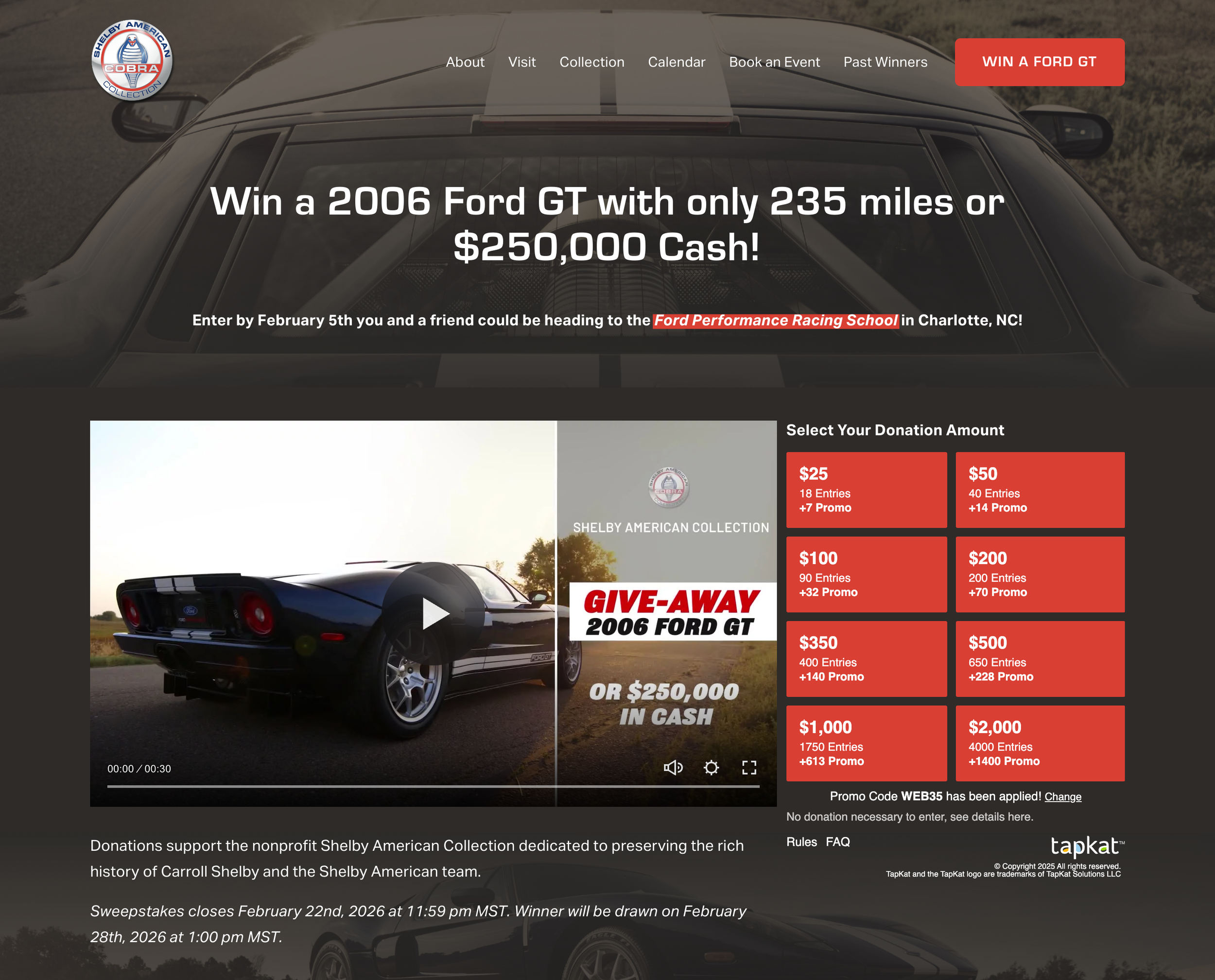
The Shelby American Collection provides a great example of a strong sweepstakes landing page on their website. In this screen capture, they are currently running a flash contest, which is promoted in the sub-headline.
Create a Clear Headline
Just like on the TapKat hosted site, your sweepstakes page needs a clear, concise headline that describes the prize and helps your reader understand what you’re asking them to do. Something like:
Enter to Win This New Porsche + $10,000!
Donate for a Chance to Win a 5-Night Paris Getaway!
Enter to Win a $5,000 Whole Foods Gift Card and Support Homeless Veterans!
Each example above invites the donor to enter, clearly defines what the prize is, and in some cases, also makes it clear that their donation is supporting the nonprofit.
Include Great Photographs and Video
The very best TapKat sweepstakes plugin pages include fantastic imagery of the prize. Each photo should help the viewer clearly see what the prize is, and also envision the glamorous experience of winning the prize. For instance, it’s one thing to include a smoggy photo of Paris that was taken on a tourist’s smart phone… it’s another thing to include a splashy, colorful photograph of the Eiffel Tower at sunset, grandly overseeing the Seine with a blue sky in the background.
Which version of Paris would you rather visit?

Which version of Paris would you rather visit?
Choose good photos that make you want to win the prize and you’ll have much more success in your fundraising endeavors. For more tips and thoughts on how to get the best photographs of your prize, check out this blog post.
In addition to including a stellar hero image on your page right below the text headline, it’s a good idea to include additional photos on this landing page so that readers can scroll and see more pictures of the prize. Then, we suggest including the TapKat Donation Plugin again at the bottom of the page so that a reader doesn’t have to scroll all the way back up the page when they’ve decided to donate.
Include the TapKat Donation Plugin & Important Sweepstakes Details
The TapKat Donation Plugin must be on the landing page if you want to take donations. When your sweepstakes is active and the plugin is properly installed, your donors will see a selection of buttons that allow them to choose which donation amount they wish to choose. Once they click on it, they’ll be guided through a series of steps to safely and securely make their donation to your nonprofit.
Note that the TapKat Donation Plugin will not go live until the sweepstakes is live. Also note that when you’re logged into your dashboard and navigate to the Donation Plugin page, there is a downloadable PDF that offers instructions for setting up your TapKat Donation Plugin.
In addition to the TapKat Donation Plugin, your donors will want to know three key details about the sweepstakes:
The date the sweepstakes closes
The date you will be drawing the winner
Where you will be drawing the winner
If you’re planning on drawing the winner online, you don’t need to include a specific web address unless you have it. The winner’s name and location will be posted automatically via the TapKat Donation Plugin once the sweepstakes winner has been drawn and confirmed.
Add Prize Details
Now you need some text that describes your prize and includes important details. Make sure that in addition to providing a description of your prize, the text also emphasizes how exciting the prize is! Often this descriptive text will be available through your prize provider (say, if your prize is a car, the dealership will likely have verbiage to describe the specs). However, you can also use AI to draft up your sweepstakes text. Make sure that the descriptions are accurate! AI is still known to hallucinate, and the last thing you want is to describe a prize that you don’t actually have.
Learn more about using AI services like ChatGPT to craft prize descriptions in this blog post.
Now it’s Time to Start Fundraising with Your TapKat Sweepstakes!
Once you have all these elements in place, you’re all set! Be sure to share your sweepstakes link:
On the homepage of your website
On your social media channels
Via email to your donor base
With any partners or sponsors who will share on your behalf
Ready to get started with a TapKat sweepstakes? Click here to apply for an account today.